Your Dashboard Explained
Your dashboard is the first thing you see when you log in. It's designed to give you an immediate read on the health of your pipeline without needing to dig through reports. Here's a complete walkthrough of every section.
KPI Chips (Top Row)
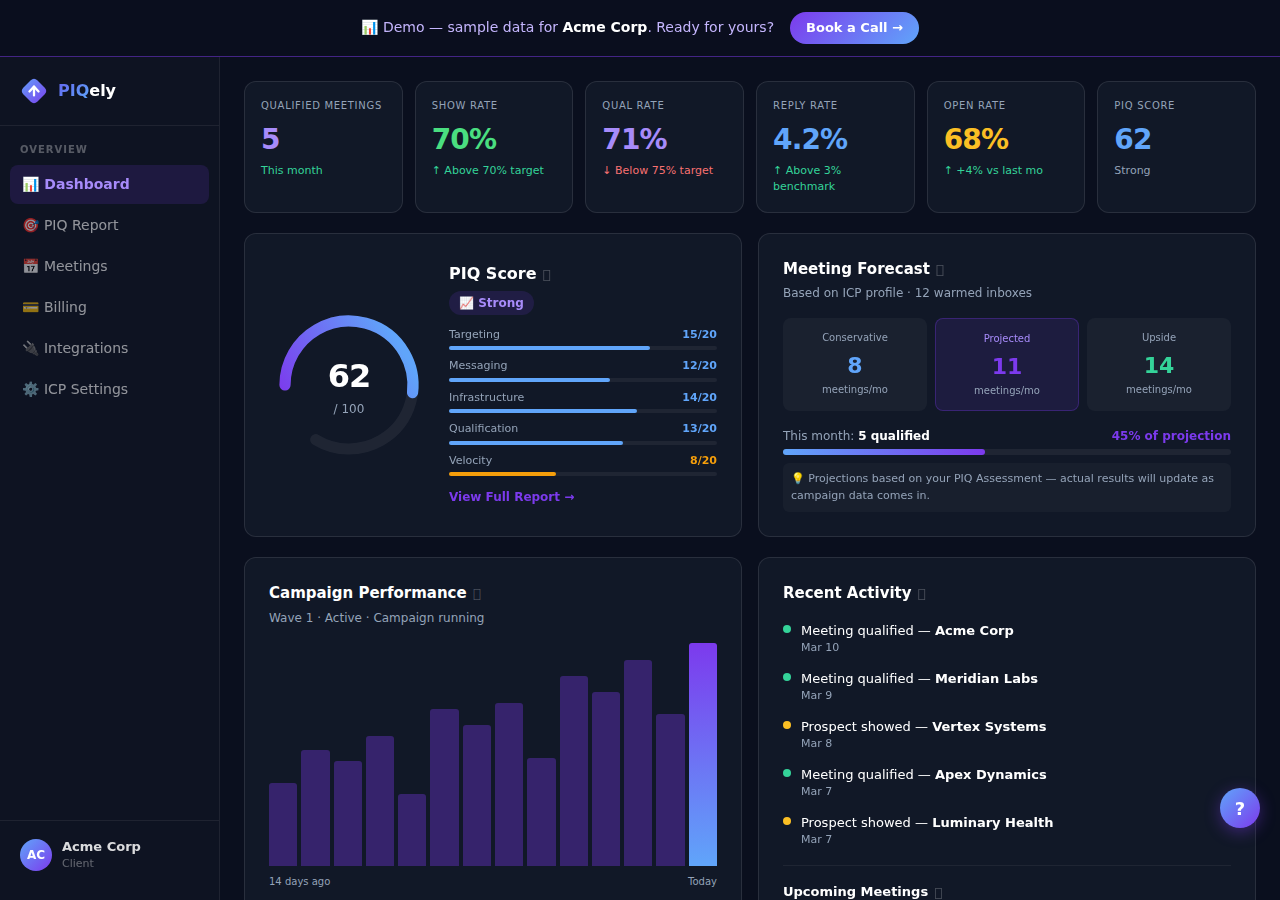
The four chips at the top of your dashboard give you a real-time snapshot of your pipeline performance.
Total Meetings The total number of meetings in your pipeline across all statuses: pending review, booking link sent, booked, qualified, and disqualified. This is your cumulative pipeline volume.
Qualified Meetings Meetings that met your ICP criteria, occurred, and triggered a $250 fee. This is the number that matters for ROI tracking. A growing qualified count means your outbound is working.
Reply Rate The percentage of sent emails that received any reply. This is calculated across your active Smartlead campaign. Benchmark: 3–5% is strong, 5%+ is elite. If your reply rate drops below 2%, your sequence may need refreshing. Your CSM will proactively flag this.
Active Campaigns The number of campaigns currently in sending status. Most clients have 1 active campaign. If this shows 0 and your warmup is complete, contact your CSM.
Onboarding Checklist
This card appears until your pipeline is fully live. It tracks the four setup milestones:
- Slack connected: Whether you've connected a Slack channel for meeting alerts (optional but recommended)
- ICP configured: Whether your target industries and job titles are set in Settings → ICP Targeting
- Inboxes ready: Whether your sending inboxes have hit 85%+ warmup reputation
- Campaign live: Whether an active campaign is running
- Prospect name and company: who you're meeting with
- Status badge: color-coded current pipeline stage: - 🟡 Pending: Wire has flagged this as interested, awaiting booking link send - 🔵 Link Sent: Booking link has been sent to the prospect - 🟣 Booked: Prospect has scheduled a call - 🟢 Qualified: Call occurred and was auto-qualified; $250 charged - 🔴 Disqualified: No-show or removed from pipeline
- Each inbox email address and its domain
- A color-coded status indicator: - 🟢 Warmed: Inbox is ready to send (reputation 85%+) - 🟡 Warming: Still building reputation - 🔴 Issue: SMTP or IMAP connectivity problem (your CSM is notified automatically)
- A warmup score or reputation percentage
- Daily send limit vs. daily sent count
- 🟡 Warming: Your inboxes are still building reputation
- 🟢 Campaign Live: Sends are active
Each step shows a status (✅ done or the current state), and incomplete steps include a direct link to fix them. The checklist disappears automatically once your ICP, inboxes, and campaign are all green.
Upgrade Banner
If you're on the Standard plan, you'll see a banner explaining the benefits of PIQ Pro: dedicated branded sending domains and 12 exclusive inboxes. This banner disappears if you upgrade. See Standard vs PIQ Pro for the full comparison.
Recent Meetings
This section shows your 5 most recent meetings sorted by most recently booked. Each row shows:
Click View all → to go to the full Meetings page with pipeline and list views, time filters, and CSV export.
Inbox Health
This section shows the warmup status of your dedicated sending inboxes.
What you'll see:
What "warming" means in practice: A new inbox needs to establish a sending history before ISPs (Gmail, Outlook) trust it. During warmup, our system automatically sends low-volume emails between warmed accounts and marks them as legitimate. This builds a track record that lets us send at full volume without spam flags.
PIQ Score Widget
Your current PIQ (Pipeline Intelligence Quotient) score is displayed as a gauge with your five dimension scores:
| Dimension | What it measures |
| --- | --- |
| Targeting Precision | How well your ICP matches your actual best customers |
| Messaging Resonance | How effectively your email copy generates replies |
| Infrastructure Health | Sender reputation, bounce rate, deliverability |
| Qualification Discipline | How consistently meetings meet ICP criteria |
| Pipeline Velocity | How fast prospects move from reply to qualified |
Click anywhere on the PIQ widget to go to the full PIQ tab, where you'll see your trend chart across assessments, detailed dimension breakdowns, your ICP summary, and personalized recommendations.
Campaign Status Pill (Top Bar)
In the top-right corner of every page, you'll see a status pill:
Frequently Asked Questions
Why does my dashboard show 0 meetings? If your campaign just launched, it typically takes 3–7 days to generate the first replies and 2–3 weeks for the first booking. Check your Campaigns tab to confirm sends are going out.
My PIQ score looks low—should I be worried? A low score at the start of your engagement is normal. It's a baseline, not a grade. The trend matters more than the absolute number. See How to Read Your PIQ Score.
The inbox health section shows a red inbox—what do I do? Your CSM is automatically notified when an inbox shows SMTP or IMAP issues. You don't need to do anything; we'll resolve it and let you know.